
If you’re just looking for information on how to configure your email account – click here.
Getting Started With Your New Email Account
Gordon Multimedia offers its clients Rackspace Email services. Rackspace is a premium email hosting service provider.
If we’ve just set up your new account, you probably received your username and temporary password in an email. Your username is always your full email address.
To set your password to something you’ll remember, use Rackspace’s webmail login: http://apps.rackspace.com/index.php. Use your email address as the username and the use password we’ve provided you with to login. Once logged in, click on the menu icon in the top right corner and then select settings:
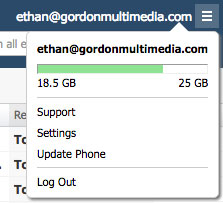
From the settings menu, select ‘Change Password’.
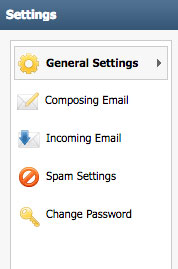
Configure Your Email Program
Now that your password is reset, you can always return to the webmail interface to check your email, or you can set up an email program (either on your phone or desktop or both) to check and send email. Rackspace has a convenient email setup tool to help guide you through this process. You can find their tool here: https://emailhelp.rackspace.com/
It’s our recommendation that you setup your email to check your account using the secure IMAP settings. We also highly recommend that you follow the instructions to sync your various IMAP folders. These instructions should also be found in the instructions on Rackspace’s website on how to setup your email program.